
Hudu Documentation Automation for MSPs
Keep your Hudu Knowledge Base current automatically. Ticket2Doc turns resolved PSA tickets into sanitized Hudu articles with no manual writing.
Hudu Documentation, Written For You
Hudu is only as useful as the articles inside it. Most MSPs fall behind because writing a KB article by hand takes time technicians don’t have, so documentation drifts out of date. Ticket2Doc closes that gap by generating Hudu articles automatically for any ticket a technician flags as worth documenting.
How It Works With Hudu
- A technician flags the ticket in Syncro, Halo, or ConnectWise (a custom field in Syncro/ConnectWise, or a dedicated ticket action in Halo) when it’s worth documenting.
- Ticket2Doc receives the webhook, strips passwords, IPs, and other sensitive details in memory, and structures the resolution note into a clean SOP.
- The article is created directly in Hudu under the correct client company via the Hudu REST API, with a backlink to the original ticket for audit traceability.
No copy-paste, no separate documentation pass, no articles that silently go stale.
Why MSPs Use Ticket2Doc for Hudu
| Feature | Ticket2Doc | Manual Hudu Entry |
|---|---|---|
| Time per article | 0 minutes (automatic) | 20 to 45 minutes |
| Credential safety | Passwords & IPs stripped in memory before storage | Manual redaction, easy to miss |
| Coverage | Every ticket a technician flags | Whatever technicians get to |
| Sync method | Direct Hudu REST API | Manual copy and paste |
Ticket2Doc supports Hudu alongside IT Glue, so you’re not locked into a single knowledge base platform if that changes down the road.
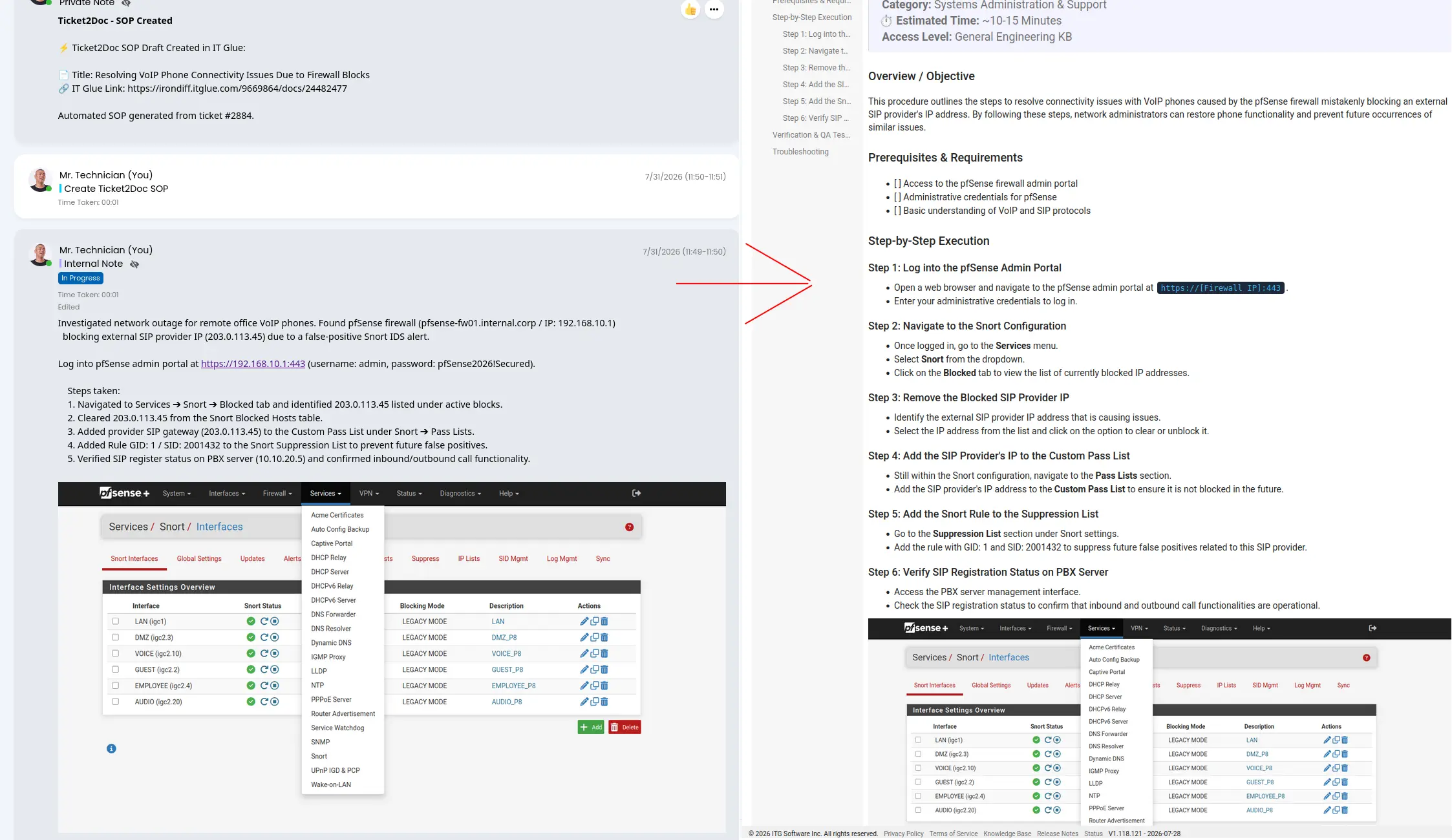
This is an actual Ticket2Doc run, not a mockup: a Halo PSA ticket with raw technician notes and a screenshot, automatically turned into a sanitized SOP in Hudu or IT Glue.
See What It Would Save Your Service Desk
Drag the slider to your monthly ticket volume.
*Based on an average manual SOP writing time of 20 mins per ticket and technician billing cost of $40/hr, against the Unlimited plan.
Frequently Asked Questions
Does Ticket2Doc create a Hudu article for every resolved ticket?
No. Generation is opt-in per ticket: a technician flags it by checking a custom field in Syncro or ConnectWise, or running a dedicated ticket action in Halo PSA. Only flagged tickets get an article.
How does Ticket2Doc know which Hudu company to file the article under?
It automatically matches the ticket's client name from Syncro, Halo, or ConnectWise to the corresponding Hudu Company. If no match is found, the article is created in your global Knowledge Base instead.
What do I need to connect Hudu to Ticket2Doc?
A Hudu API key generated under Admin, then API Keys, in your Hudu instance, plus your Hudu instance base URL, entered under Settings, then Integrations, then Hudu KB, in the Ticket2Doc portal.
Does Ticket2Doc also support IT Glue?
Yes. Hudu and IT Glue are both supported as knowledge base destinations, selected per tenant, so switching later doesn't require changing your PSA setup.
Are passwords and IP addresses stripped before the Hudu article is created?
Yes. IP addresses, passwords, and internal hostnames are scrubbed from the ticket note in memory before it's structured into an SOP and before anything reaches the AI processing engine.
Experience Automated SOP Generation Today
Try Ticket2Doc free for 14 days and see how effortlessly PSA ticket notes convert into clean Hudu or IT Glue SOPs.
Start 14-Day Free TrialNo credit card required.